#5 Daily Rabbit Holes: Rust Threads + TUI = A Nerdy Little CPU Monitor

Welcome back to another article of The Daily Rabbit Hole.
Today’s rabbit hole starts with a simple question:
"How to build a basic CPU monitor using Rust and a terminal UI?"
The real goal here is to create a simple and visual example to practice using threads in Rust. It’s a small playground to explore shared memory, concurrency, and synchronization.
For this little project we will use the following:
Project Setup
Create a Cargo project, add the Cursive and Sysinfo dependency…
cargo new threads-cursive-sysinfo-example
cd threads-cursive-sysinfo-example
cargo add cursive
cargo add sysinfo
The Code
// main.rs
use std::{sync::{Arc, Mutex}, thread, time::Duration};

use cursive::{
    view::Nameable,
    views::{LinearLayout, TextView, Panel, DummyView},
    Cursive, CursiveExt,
    theme::{Theme, ColorStyle, PaletteColor, Color},
    align::HAlign,
};
use sysinfo::System;

struct AppState {
  system: Mutex<System>,
  usage_data: Mutex<Vec<f32>>
}

impl AppState {
  fn new() -> Arc<Self>{
    let sys = System::new_all();
    let core_count = sys.cpus().len();
    Arc::new(Self {
      system: Mutex::new(sys),
      usage_data: Mutex::new(vec![0.0; core_count])
    })
  }

  fn refresh_cpu_usage(&self) {
    let mut sys = self.system.lock().unwrap();
    sys.refresh_cpu_all();

    let mut data = self.usage_data.lock().unwrap();
    for (i, processor) in sys.cpus().iter().enumerate() {
      data[i] = processor.cpu_usage();
    }
  }
}

fn create_ui(state: &Arc<AppState>) -> LinearLayout {
    let mut layout = LinearLayout::vertical();

    // Title
    layout.add_child(TextView::new("CPU Monitor")
        .style(ColorStyle::title_primary())
        .h_align(HAlign::Center));
    layout.add_child(DummyView);

    // CPU Cores Panel
    let mut cores_layout = LinearLayout::vertical();
    let core_count = state.system.lock().unwrap().cpus().len();

    for i in 0..core_count {
        cores_layout.add_child(
            TextView::new(format!("Core {}: |", i))
                .style(ColorStyle::primary())
                .with_name(format!("core_{}", i)),
        );
    }

    layout.add_child(Panel::new(cores_layout)
        .title("CPU Usage"));

    // Footer
    layout.add_child(DummyView);
    layout.add_child(TextView::new("Press 'q' to quit")
        .style(ColorStyle::secondary())
        .h_align(HAlign::Center));

    layout
}

// thread for updating the UI
fn start_update_thread(ui_handle: cursive::CbSink, state: Arc<AppState>) {
    thread::spawn(move || {
        while let Ok(()) = ui_handle.send(Box::new({
            let state = Arc::clone(&state);
            move |s| {
                state.refresh_cpu_usage();
                let data = state.usage_data.lock().unwrap();

                for (i, usage) in data.iter().enumerate() {
                    let bar = generate_bar(*usage);
                    s.call_on_name(&format!("core_{}", i), |view: &mut TextView| {
                        view.set_content(format!("Core {:2} : {}", i, bar));
                    });
                }
            }
        })) {
            thread::sleep(Duration::from_secs(1));
        }
    });
}

// Simple ASCII progress bar
fn generate_bar(usage: f32) -> String {
    let total_blocks = 50;
    let filled_blocks = (usage / 100.0 * total_blocks as f32).round() as usize;
    let bar = "█".repeat(filled_blocks);
    let empty = " ".repeat(total_blocks - filled_blocks);
    format!("[{}{}] {:.2}%", bar, empty, usage)
}

pub fn main() {
    let mut siv = Cursive::default();

    // Customize theme
    let mut theme = Theme::default();
    theme.palette[PaletteColor::Background] = Color::Rgb(30, 30, 30);
    theme.palette[PaletteColor::View] = Color::Rgb(40, 40, 40);
    theme.palette[PaletteColor::Primary] = Color::Rgb(0, 150, 150);
    theme.palette[PaletteColor::Secondary] = Color::Rgb(100, 100, 100);
    siv.set_theme(theme);

    let state = AppState::new();
    let layout = create_ui(&state);
    siv.add_fullscreen_layer(layout);
    siv.add_global_callback('q', |s| s.quit());
    start_update_thread(siv.cb_sink().clone(), Arc::clone(&state));

    siv.run();
}
How It Works
The code is ~100 lines and does the following:
Initializes a struct
AppStatethat holds a sharedSysteminstance and an array of CPU usage data, protected with mutexes.Builds a UI layout using
Cursive, showing:A title
A dynamically updating panel of all your CPU cores
A quit hint at the bottom
Spawns a background thread that:
Updates the CPU usage data every second
Sends updates to the UI thread via
cb_sinkDraws a simple ASCII progress bar for each core
Let’s break down a few key pieces.
Shared App State
struct AppState {
  system: Mutex<System>,
  usage_data: Mutex<Vec<f32>>,
}
All core CPU data is shared across threads using Arc<Mutex<T>>, allowing the update thread and UI thread to read/write safely.
The UI Layout
TextView::new("CPU Monitor")
  .style(ColorStyle::title_primary())
  .h_align(HAlign::Center);
Each core gets a TextView with a name like core_0, core_1, etc., so we can update it dynamically later.
s.call_on_name(&format!("core_{}", i), |view: &mut TextView| {
    view.set_content(format!("Core {:2} : {}", i, bar));
});
The Update Loop
while let Ok(()) = ui_handle.send(Box::new({...})) {
  thread::sleep(Duration::from_secs(1));
}
Inside this loop, the AppState is refreshed and each core’s usage is rendered as a bar using the generate_bar helper:
fn generate_bar(usage: f32) -> String {
    let total_blocks = 50;
    let filled_blocks = (usage / 100.0 * total_blocks as f32).round() as usize;
    format!("[{}{}] {:.2}%", "█".repeat(filled_blocks), " ".repeat(total_blocks - filled_blocks), usage)
}
Understanding Arc and Mutex in Rust
This whole project revolves around safely sharing and updating data across threads. That’s where Arc<Mutex<T>> comes into play.
Mutex<T>lets us mutate shared data safely. It ensures that only one thread at a time can access the data inside.Arc<T>(Atomic Reference Counted pointer) allows multiple threads to hold ownership of the same value.
Together, Arc<Mutex<T>> means:
"Hey Rust, let multiple threads own this data, but make sure only one thread at a time can actually mutate it."
Here’s what that looks like:
let data = Arc::new(Mutex::new(vec![0.0; num_cores]));
Each thread that needs access clones the Arc:
let data_clone = Arc::clone(&data);
Then locks the mutex before using the data:
let mut usage = data_clone.lock().unwrap();
usage[i] = new_value;
The lock gives you a mutable reference inside a Result, hence the unwrap() (or better: proper error handling).
Run The Example
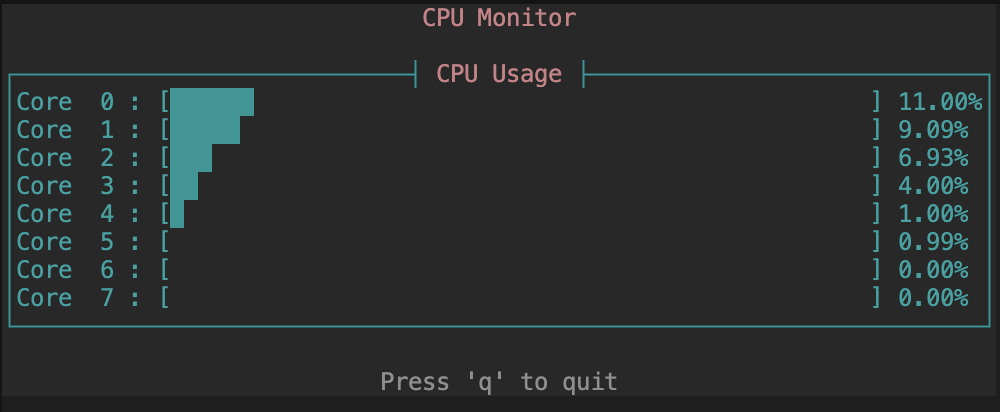
It’s time to see the result!! 😱
cargo run
You should see something similar.